
Introduction
At first glance, building a mobile app seems like an effortless task. But the real challenge is to design an app that scales smoothly with an increase in usage. This is where Flutter GetX becomes useful.
In simple words, the Flutter GetX tutorial explains how developers can manage app data and navigation in an easy way. The right application of GetX in development helps build scalable Flutter apps. These apps are easy to maintain, even as the application grows.
Using the right architecture with GenX makes a big difference for the company providing Flutter mobile app development services. It offers long-term performance and maintainability.
In this blog, we will walk through the Flutter GetX tutorial to follow while building scalable mobile applications.
Overview of Flutter GetX
Flutter GenX is helping developers manage data flow in an app without writing or adding excessive code. It is a tool used inside Flutter that makes app development easier and more organized.
The GetX framework simplifies the following tasks:
State Management- Controlling how data changes in the user interface
Navigation- Transiting between screens
Dependency Management- Managing how components interact with each other
Nowadays, development teams are focusing on scalable Flutter apps with GenX. It reduces complexity and improves performance at the same time.
Three Pillars of GetX
Instead of depending on multiple tools, GetX brings a single framework that offers several important features on one platform. The core functionality of GetX is built on three pillars, as mentioned below:
State Management
It controls how data changes in the user interfaces. In this, GetX provides several widgets to manage state effectively.
GetXWidget: a reactive widget that automatically rebuilds when observable values change
GetBuilder: a lightweight solution for simple state updates
Obx: a highly efficient reactive widget used for dynamic UI updates.
These GetX tools allow developers to manage application data without interrupting the responsive interface.
Dependency Injection
Dependency controls how different parts of the application interact with each other.
GetX provides simple solutions to manage dependencies effectively.
Get.put( ): It creates and stores real-time dependencies.
Get.lazyPut( ): It creates dependencies only when they are needed for performance.
Get.find( ): It retrieves previously created dependencies.
This approach keeps the application organized and efficient.
Route Management
Navigation is an integral part of mobile applications. GetX simplifies it by a straightforward route configuration.
Here are some common navigation methods:
Get.to( ): move to a new screen
Get.off( ): replace the current screen
Get.offAll( ): clear the navigation stack and open a new screen
These methods let developers handle navigation with simpler code.
Key Benefits of Flutter GetX
Flutter GetX offers many benefits for businesses, organizations, and growing startups. Some key benefits are listed below.
Compact Boilerplate Code: It offers simple code compared to many traditional state management solutions.
Enhanced Performance: It only optimizes widgets that require updates. Hence, it reduces unnecessary rebuilds.
Easy to Learn: It is a beginner-friendly yet powerful tool for large projects.
All-in-One Framework: It consists of features like state management, dependency injection, and navigation in a single framework.
These features put GetX ahead as a strong option for teams aiming to build scalable Flutter applications.
Find below the brief comparison of Flutter GetX with Traditional State Management Solutions.
Flutter GetX vs Traditional State Management
Here is a table that shows some major differences between Flutter GetX and state management in brief.
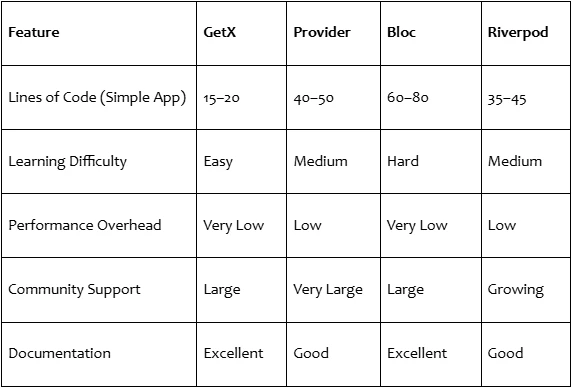
Flutter GetX offers the required features in a single framework. Hence, it is enabling developers to manage big application projects with a proper structure.
Let’s explore best practices developers follow worldwide while building scalable Flutter apps with GetX.
Best Practices For Building Scalable Flutter Apps with GetX
GetX is very simple to use. But the correct use of this tool can make an app scalable.
Let’s see a few of the best practices developers prefer.
1. Implement a GetX-Friendly Project Structure
Developers focus on organizing code using folders in GetX. It helps them manage aspects of the project such as
- Controllers: To handle state and application using GetX features
- Views: To display UI and listen to state changes using
- Bindings: To manage dependency injection
- Services: To manage API calls and backend communication
- Models: To define the data structure used across the application.
GetX-friendly structure helps developers keep the code arranged and make larger applications easier to maintain.
2. Optimize State Management
There are two primary approaches to state management in GetX.
- Reactive State (.obs): It automatically updates the UI as the data changes.
- Simple State (GetBuilder): It is used when the UI needs occasional or continuous updates.
Developer teams choose an approach that helps avoid unnecessary UI rebuilds and improve application performance.
3. Separate UI and Logic Using GetX Controllers
In GetX architecture, controllers focus on managing the business logic, state, and API calls. At the same time, views focus only on the user interface. It displays the data using widgets like 0bx( ).
This separation helps keep the code clean and the application easy to maintain.
4. Implement Dependency Injection with Bindings
GetX offers in-built dependency methods like
Get.put ( ) - to create and store an instance quickly
Get.lazyput ( ) - to create the instance only when required
Get.find ( ) - to retrieve an existing dependency
In GetX, dependency injection with bindings ensures controllers and services are loaded efficiently. As a result, the application reduces unnecessary memory usage and performs better.
5. Use Reactive Variables Carefully
Reactive variables (.obs) automatically update UI whenever the value changes. However, developers should only make variable reactive if Auto User interface updates are required.
Designs with many reactive variables make debugging harder and increase unnecessary UI rebuilds.
6. Lightweight and Focused Controllers
Controllers manage state and logic in applications. At the same time, its simplicity and feature-oriented nature help improve efficiency.
Instead of adding too much logic to a single controller:
- Keeps controllers small
- Move complex operations into services
It improves overall app readability and maintainability.
7. Use GetX Navigation for Simple Routing
GetX provides simplified navigational routes without extra BuildContext. Commonly used GetX navigation methods include:
Get .to( ) - to navigate to a new screen
Get .off( ) - replace the current screen
Get .offAll( ) - remove all previous routes
It simplifies navigation in large Flutter applications.
8. Track State Updates Using GetX Tools
It is easier to observe how changes in state affect the user interface in GetX.
Monitoring of follows helps the developer team to identify unnecessary code and improve overall performance.
- Reactive variable updates
- Controller lifecycle events
- UI rebuild behavior
Here is a step-by-step process on how companies implement GetX in Flutter Mobile App Projects.
How Companies Implement GetX in Mobile Projects
Here is a simple implementation method for a Flutter app development company.
Step 1: Define Architecture
As a first step in GetX, start with planning the project structure, controllers, servers, and routing system.
Step 2: Separate UI and Logic
Separate the user interface from the application logic. It maintains clean and manageable code.
Step 3: Implement Services
Now, place the API integrations and backend logic inside service layers.
Step 4: Monitor Performance
Once all three steps are done, keep monitoring app performance regularly and optimize state management as per the requirements.
This simple process guarantees that mobile apps remain scalable and easy to maintain.
Conclusion
Flutter GetX is the most popular tool among developers for building scalable cross-platform applications. It offers simplification of state management, navigation, and dependency handling with compact code.
However, the right application of GetX in development practices is equally important. Clear project structure, simple controllers and logic, and UI separation can build efficient applications.
For businesses providing Flutter app development services, working with GetX can help ensure these best practices.