Empowering Front-End Development with Sitecore JavaScript Services
Introduction
In today’s digital experience economy, Sitecore XP offers a unified platform for personalized content delivery across multiple channels and at scale. Built to support multi-site and multi-lingual environments, Sitecore CMS stands out with its flexibility and robustness.
One of the key innovations for front-end developers is Sitecore JavaScript Services (JSS)—an SDK that allows the creation of rich, component-based web applications using modern JavaScript frameworks like React, Angular, and VueJS. In this article, we’ll walk you through creating a ReactJS application using Sitecore JSS and applying personalization using a Sitecore-first approach.
-Prerequisites
Before you begin, ensure you have the following:
-Node.js v14.15.4
-Sitecore 10 installed
-Sitecore JSS 15.0 (configured in Sitecore instance)
-JSS CLI (optional) – speeds up app creation and scaffolding
Step-by-Step Integration: ReactJS with Sitecore
-Step 1: Create a Sitecore Application
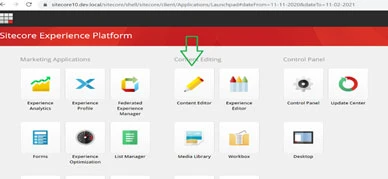
In the Content Editor, navigate to:
/sitecore/content → Create a Tenant, then a Site under that tenant.
Choose Sitecore-first or Code-first approach:
Sitecore-first: Templates and content created in Sitecore.
Code-first: Managed fully by the front-end team via Node.js.
-Step 2: Create a React Application
Use JSS CLI to scaffold your React app:
bash
Copy
Edit
jss create my-jss-app react
Run npm install to set up dependencies.
Sitecore JSS packages will be added by default.
-Step 3: Configure Site and Hostname
In IIS, add the desired host: demojss.dev.local
Add the hostname in your system's hosts file:
C:\Windows\System32\drivers\etc\hosts
-Step 4: Setup API Key in Sitecore
Login at: https://demojss.dev.local/sitecore
Open Desktop → Content Editor
Generate and assign an API Key to your JSS app.
-Why Sitecore JSS?
-Seamless integration with Sitecore CMS
-Supports personalization, multilingual content, and headless architecture
-Empowers React developers with full control over the UI
-Ideal for connected & disconnected development workflows
-Additional Topics Covered
Sitecore Serialization via CLI
-Setting up Next.js + Sitecore JSS in disconnected mode
-Sitecore Publishing Targets for multi-environment setups
-Troubleshooting Java Heap Space errors in Solr
-Sitecore Security Disabler & User Switcher tools
-XM Cloud deployment with Vercel and Deploy.io
-Sitecore Marketing Glossary and training resources
-Exploring Sitecore Headless CMS, XP, SXA, and JSS
Need Certified Sitecore Developers?
Murmu Software Infotech offers remote Sitecore experts skilled in:
Sitecore XM | XP | SXA | JSS | XM Cloud
Full-cycle development, support & integration
Budget-friendly hiring (hourly/monthly plans)
Contact: +91 9110176498
Email: [email protected]
Website: https://sitecoredevservices.com/create-sitecore-jss-react-application-and-apply-personalization/
Mall Decor, Lalpur Chowk, Ranchi, Jharkhand
#sitecoredevelopment #sitecorejss #reactjs #xmcloud #sitecorecms #nextjs #headlesscms #murmusoftwareinfotech #remotesitecoredevelopers #sitecorexp #sitecorepersonalization #webdevelopment #digitalexperience #enterprisecms #sitecoreindia