
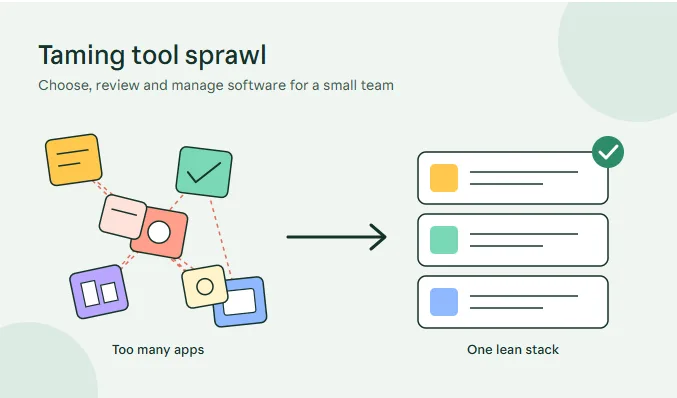
Subscription software has made powerful tools available to every small business. It has also created a new problem: tool sprawl. When every task has its own app, teams spend more time switching, searching and reconciling than doing the work. Costs creep up, data scatters and nobody is quite sure where the latest version of anything lives.
This article offers a practical approach to choosing and managing software for a small team: recognising the signs of sprawl, reviewing your stack, asking the right questions before buying, handling marketing tools in particular and building habits that keep the toolkit lean.
Signs you have too many tools
- Several apps do overlapping jobs, such as two project boards or three messaging channels.
- Nobody is sure where information lives, so people ask in chat instead of searching.
- You pay for seats and features no one uses.
- New hires need weeks to learn the stack.
- Data has to be copied manually from one place to another.
- Passwords and logins are shared informally.
- Subscriptions renew without anyone remembering why.
If several of these sound familiar, a review will almost certainly pay for itself.
A simple review process
- List every tool and its monthly or annual cost. Check credit card statements, expense reports and password managers to find forgotten subscriptions.
- Mark what each is used for, and by whom. Ask team members directly.
- Rate each tool for how essential it is, how well it is used and how easy it is to replace.
- Merge or remove overlaps. Choose one tool for each job and migrate data carefully.
- Check integrations. Tools that connect cleanly save manual work, while isolated ones create silos.
- Assign an owner to each tool who manages access, billing and updates.
- Re-review twice a year.
Questions to ask before adding anything new
- What specific problem does this solve, and how will we measure success?
- Can an existing tool already do it, perhaps with a small change in how we work?
- How easily can we export our data if we leave?
- Who owns it internally, and who will train others?
- What does it really cost, including add-ons, extra users and time spent managing it?
- How does it handle security and privacy, and does it meet our legal obligations?
- What happens if the vendor changes pricing or shuts down?
Write answers down. A short evaluation note makes later reviews far easier.
Total cost of ownership
The sticker price rarely tells the whole story. Add the time to set up, migrate data, train people and maintain the tool. Add the cost of connecting it to other systems and of any consultants you may need. Consider the cost of leaving, such as export fees or lost history. A cheaper tool that consumes hours of team time every week can end up costing more than a pricier one that works smoothly.
Pilot before you commit
Run a trial with a small group and a real task. Define success in advance, for example, “reduce time to publish a post by thirty per cent” or “cut the number of status meetings by half”. Collect honest feedback at the end of the trial, including from sceptics. Only then roll out to the whole team, with training and a clear date for retiring the old method.
Marketing stacks are a common culprit
Separate tools for keyword research, writing, scheduling, social listening, design and reporting add up quickly. Each has its own login, data and learning curve, and the work of joining them falls on someone’s weekend. All-in-one options such as Xicmo, which brings SEO, visibility in AI search, content, social, community marketing, creator discovery and analytics into one workspace, aim to reduce that sprawl. As with any tool, test it on a real task before committing, compare it with your current process and keep a person responsible for approving what is published.
Buy assets, don’t rebuild them
Not every item in your toolkit has to be a subscription. For templates, fonts, plugins, graphics and design kits, a marketplace like BuyBizz lets you purchase a licensed item once when that is faster than building it, with automatic delivery after payment. Check the licence terms for commercial use and the number of projects, and keep the receipts and licence keys together in a shared, secure location.
Security and access
A larger stack means a larger attack surface. Use a password manager, require multi-factor authentication, remove access promptly when people leave and review permissions each quarter. Limit admin rights to those who need them. Keep a simple register of what each tool stores, especially if it holds personal or financial data. Choose vendors that publish clear security and privacy information.
Training and adoption
A tool nobody uses is waste. Introduce new software with a short walkthrough, a one-page guide and a named person to ask. Collect tips from early adopters and share them. Retire old tools on a firm date so that people do not drift back. Check usage after thirty and ninety days, and ask what is not working.
Cultural habits that keep the stack lean
Encourage a “one in, one out” rule: when someone proposes a new tool, ask which existing one it replaces. Ask for a short written case before purchase. Review renewals a month before they happen. Celebrate simplification as an achievement. Over time, the team learns to value focus over novelty.
A worked example
Consider a ten-person design agency that, over three years, accumulated a project tool, a second project tool inherited from an acquisition, three chat apps, two file-sharing services, four design subscriptions and a scheduling tool that only one person used. A review revealed that the team was paying for about forty subscriptions, of which fifteen overlapped.
The agency picked one project tool, one chat app and one storage service, and moved the rest of their data across over six weeks. They kept two specialist design tools that clearly earned their place and cancelled the others. Monthly costs fell by roughly a third, new hires were up to speed in days rather than weeks, and project updates stopped getting lost in side conversations. The biggest gain, according to the team, was mental: fewer places to check, and less guilt about forgotten tabs.
Handling migration without drama
Moving between tools is where many teams stumble. Plan in stages. Back up all data first. Choose a quiet period, run both tools side by side for a short time and migrate a pilot project before the rest. Communicate dates clearly, hold a short training session and give people a place to ask questions. Archive old data in a searchable form, and set a firm date when the previous tool becomes read-only. A careful migration prevents the dip in productivity that makes teams afraid of change.
Budgeting and renewals
Create a single list of software costs, with renewal dates and owners. Review it quarterly, flag anything unused for sixty days and ask owners to justify each major renewal. Negotiate annual plans only for tools you are sure you will keep, and watch for automatic price increases. Small savings across many subscriptions can fund a more valuable investment, such as training or better equipment.
Choosing for the stage of your business
A five-person startup needs different tools from a fifty-person company. Early on, favour simple, flexible tools that everyone can learn quickly. As you grow, you may need stronger permissions, reporting and integrations. Avoid buying for the company you hope to become in three years. Choose for today, with an eye on whether the vendor can scale with you when you really need it.
Keeping the conversation going
Tool decisions should not be made once and forgotten. Add a standing item to your monthly team meeting: what is slowing us down, and is a tool the cause? Invite people to flag annoyances early, since small irritations often point to bigger gaps in process. Keep a shared document where the team can record what works, what does not and what they would like to try. Regular conversation prevents the quiet build-up of clutter and gives everyone a voice in how the work gets done.
Setting guardrails for shared accounts
When several people use one tool, small rules prevent big headaches. Agree on naming conventions for files and projects, decide who can invite new users, set a standard for tagging or labelling and write down what to do when something breaks. A one-page guide stored where everyone can find it keeps the tool tidy and makes onboarding smoother. Review the guide when you review the tool, so it stays accurate as the team and its needs change.
Common mistakes to avoid
- Buying because a competitor does.
- Choosing on features rather than needs.
- Ignoring export and exit options.
- Skipping training.
- Letting free trials turn into forgotten paid plans.
- Giving everyone admin rights.
Final thoughts
The best software stack is the one your team actually uses. Start by removing what you do not need, choose tools that fit your real work and keep a regular rhythm of review. A lean, well-understood toolkit saves money, reduces risk and gives your people back the time that busy teams need most.