
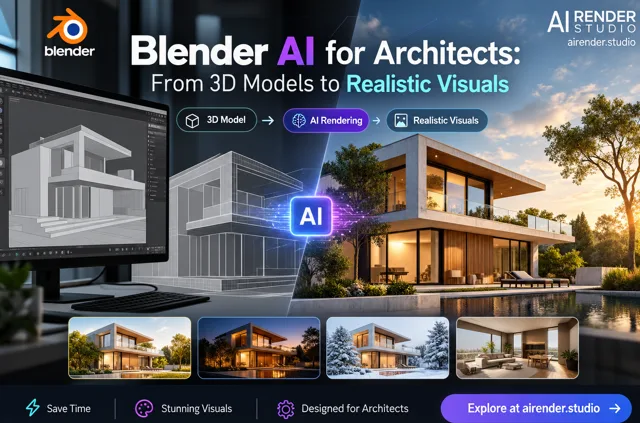
Blender has become a popular choice for creating detailed 3D models, architectural concepts, product visuals, and creative scenes. However, producing photorealistic images from a Blender project can sometimes require significant rendering time and powerful hardware. Blender AI offers a different approach by using artificial intelligence to help turn basic 3D views into realistic visualizations much faster.
For architects and designers, this can make it easier to test ideas, prepare presentations, and create visual concepts without depending entirely on traditional rendering workflows.
What Is Blender AI?
Blender AI refers to the use of artificial intelligence to enhance the visualization and rendering process for Blender projects. Instead of relying only on traditional rendering engines and manual material or lighting adjustments, AI can interpret an existing Blender view and generate a more realistic version.
A designer can start with a viewport screenshot, EEVEE preview, clay render, or other suitable image from a Blender project. AI can then help add realistic materials, lighting, textures, and environmental details while maintaining the basic composition of the original design.
This makes AI useful during concept development and design review stages.
Why Use AI With Blender?
Blender provides extensive control over 3D modeling, materials, cameras, lighting, and animation. That level of control is valuable, but it can also make the process of producing final-quality visuals more time-consuming.
Blender AI adds another option to the workflow. Designers can use their existing Blender model as the foundation and use AI to explore realistic visual directions quickly.
For example, an architectural model can be visualized with different facade materials, landscaping, lighting conditions, and surrounding environments without rebuilding the entire scene for every concept.
Faster Concept Development
Architectural projects often go through many visual changes before a final design is approved. Creating a separate detailed render for every idea can slow down the review process.
AI-powered rendering helps designers generate multiple visual possibilities more quickly. This makes it easier to compare styles and discuss design choices with clients.
A simple Blender model can become the starting point for several different visual concepts, allowing designers to focus on the overall design rather than spending excessive time preparing every test render.
Better Client Presentations
A basic 3D viewport can communicate form and structure, but realistic imagery often makes a concept easier for clients to understand.
With Blender AI, architects can create more polished visual presentations from existing project views. Realistic materials, lighting, shadows, and environmental context can help clients understand how a proposed building or space may look.
These visuals can be useful for design meetings, early project reviews, marketing concepts, and architectural presentations.
Blender AI with AI Render Studio
AI Render Studio provides a dedicated AI workflow for Blender users. The platform allows users to upload an image from their Blender project and generate photorealistic architectural visuals without requiring a high-end GPU for the AI rendering process.
AI Render Studio supports inputs such as EEVEE previews, Cycles clay renders, and simple viewport screenshots. Users can select from architecture-focused styles or describe the desired mood and materials, then generate multiple visual variations for comparison.
This makes the platform useful for architects and designers who want to move quickly from a 3D concept to a presentation-ready visual.
AI Rendering and Traditional Blender Workflows
AI does not have to replace traditional Blender rendering. Both approaches can serve different purposes.
Traditional rendering is useful when designers need detailed control over lighting, materials, cameras, and final production imagery. AI rendering can be particularly useful during concept development, design reviews, and quick visual exploration.
Using both methods gives designers more flexibility. AI can help test ideas quickly, while traditional Blender rendering can remain part of the final production process when precise art direction is required. AI Render Studio similarly describes its Blender workflow as complementary to Cycles rather than a replacement.
Benefits of Blender AI
Using AI alongside Blender can provide several practical advantages:
- Faster architectural visualization
- Quick exploration of different styles
- More realistic materials and lighting
- Easier client presentations
- Reduced rendering delays during concept development
- Greater flexibility when testing design ideas
- Less dependence on high-end rendering hardware
Conclusion
Blender AI is creating a faster way for architects and designers to explore realistic visual concepts from their existing 3D work. By combining Blender's modeling flexibility with AI-powered visualization, professionals can test ideas, improve presentations, and communicate designs more effectively.
For users looking to speed up architectural rendering without abandoning their existing Blender workflow, AI Render Studio provides a practical way to turn Blender views into photorealistic visuals and explore multiple design possibilities in less time.