
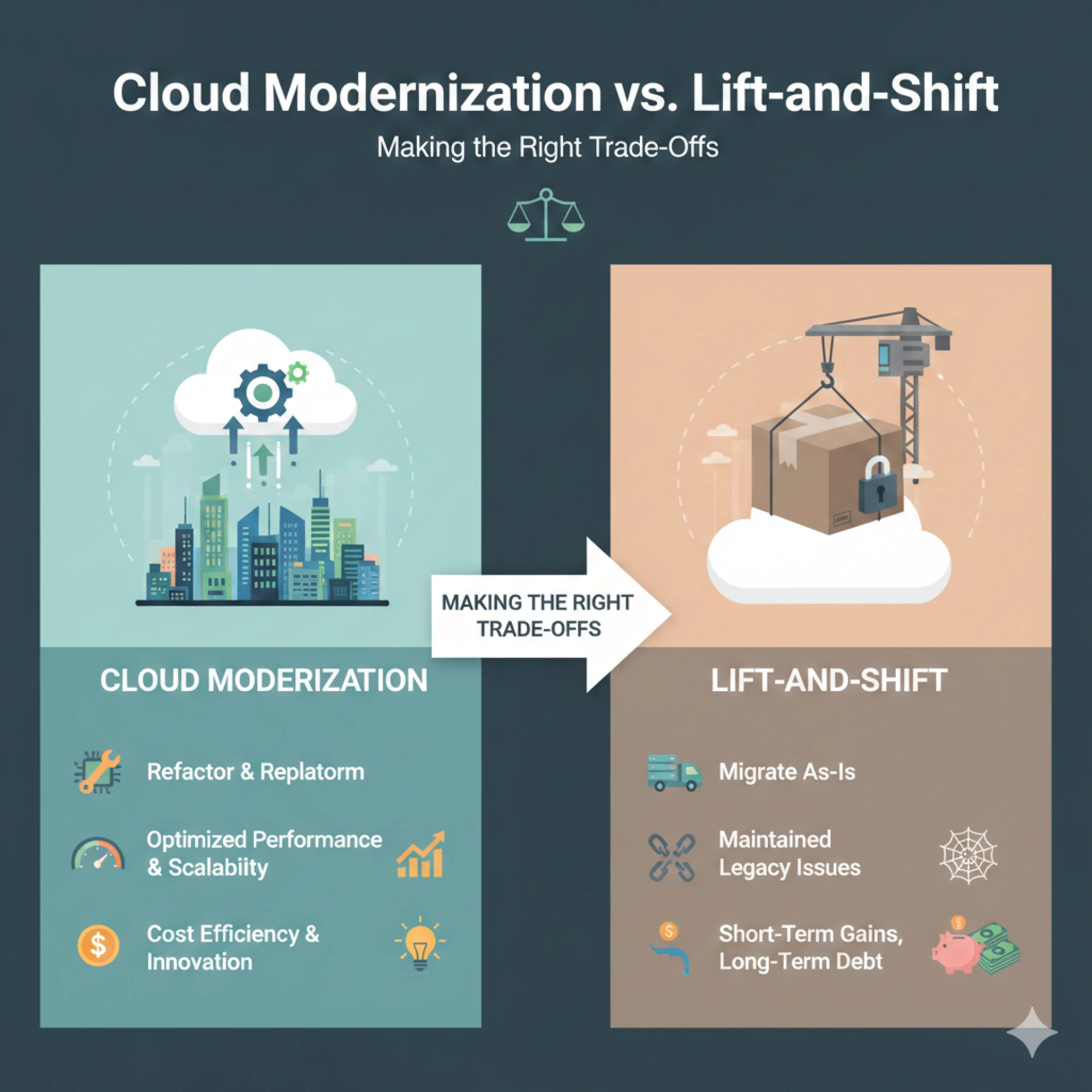
Cloud migration isn't just about relocating infrastructure anymore. It's about making architectural choices that will determine how your business will run and grow over time. But it is worth mentioning that cloud migration doesn’t always bring value as expected this is where Azure Migration Services play a crucial role in ensuring the right approach is chosen. Although lift-and-shift facilitates the quick shifting of workloads, it results in teams running their systems on new infrastructure with little or no flexibility. This is where the debate of cloud modernization vs. Lift-and-shift strikes as two contending strategies.
Both methods can move apps to Azure, but they have different effects on scalability, operational flexibility, and long-term impact.
Cloud Modernization vs. Lift-and-Shift: What does Cloud Modernization mean?
For systems to fully utilize cloud capabilities rather than just operating on new infrastructure, cloud modernization updates application architecture and operational procedures. Modernization helps organisations redesign workloads to avail the full advantage of cloud native architecture. This includes microservices, managed databases, and platform services. Hence, it is more than just relocating systems.
Main Components of Cloud Modernization Strategy are -
- Restructuring monolithic systems,
- Utilizing Azure managed services,
- Improving automation and facilitating resilience,
- Making sure that the applications are in line with your business objectives.
Modernization, which prioritizes long-term value over relocation, is the strategic choice in the cloud modernization vs. lift-and-shift discussion.
Cloud Modernization vs. Lift-and-Shift: What Is Lift-and-Shift Migration?
Rehosting, also known as lift-and-shift migration, is the process of transferring applications from on-premises settings to the cloud with minimal to no architectural alteration. Instead of transformation, speed and continuity are the essential objectives.
Main Components of Lift-and-Shift Migration are -
- The migrated applications remain as they are,
- Dependencies that are already in place are maintained,
- Modest modifications to operating models,
- Fast adoption of cloud computing.
In the context of Cloud modernization vs. Lift-and-shift, the former tries to fix and lessen problems within old systems, while lift-and-shift just moves them to the cloud.
Azure Rehost vs Refactor: Key Differences
The true trade-offs in the context of cloud modernization vs. lift-and-shift become evident when one understands Azure rehost versus refactor.
Rehost (Lift-and-Shift)
- Quicker performance.
- Reduced the initial effort to change.
- Limited optimization of performance.
- Minimal technical debt reduction.
Refactor (Modernization)
- Extended timeframe for transformation.
- Increased architectural modification.
- Enhanced scalability and performance.
- Lets you update old apps.
The 6 rs of cloud modernization say that refactoring is the most valuable way to modernize, while rehosting mostly speeds things up. This justifies the cloud modernization vs. Lift-and-Shift comparison.
Cost, Speed, and Risk: Choosing the Right Azure Migration Approach
When workloads start running in the cloud, things like cost, speed, and risk become evident.
Expense and Long-Term ROI
Businesses must plan the long-term financial impact in the context of cloud modernization vs. lift-and-shift.
- Cloud Modernization: Throughout the entire application lifecycle, Azure cloud modernization guarantees a stronger ROI and facilitates better resource utilization.
- Lift-and-shift: Although it may seem easier at first, organisations may end up paying more for ineffective resource usage.
ROI should be counted in years rather than quarters when choosing between lift-and-shift and cloud modernization.
Looking at Speed
The time it takes for cloud migration depends on how much change the organisation is willing to initiate.
- Cloud modernization: It takes longer at first, but over time, it speeds up delivery through automation and cloud-native features.
- Lift-and-shift: This lets you run applications faster by moving them to a new server with few changes. This makes it useful for meeting tight deadlines.
The best way to migrate to Azure strikes a balance between short-term deadlines and long-term operational speed in the debate of cloud modernization vs. Lift-and-shift.
Evaluating Migration Risk
In the discussion of cloud modernization vs. Lift-and-Shift, examining risk is necessary.
- Cloud modernization: complicated data transfers, lengthy timelines, and skill gaps.
- Lift-and-shift: Uncontrolled cloud spending, poor resilience, and performance problems.
Businesses can balance execution risk and long-term benefits with the aid of a structured migration risk assessment.
When Enterprises Should Modernize Instead of Rehost?
Cloud modernization often provides organisations with more strategic value in the long run.
Ideal Situations for Modernization
- Systems that deal with customers or revenue planning.
- Applications that need elastic scale.
- Platforms that are limited by their technical debt.
- Enterprises that want to upgrade to digital systems.
When it comes to cloud modernization vs. lift-and-shift, modernization makes sure that investments in technology accommodate business growth and evolving ideas.
When does Lift-and-Shift make sense for businesses?
Lift-and-shift migration is still a good option for some businesses, even though it has challenges.
Ideal Situations to use Lift-and-Shift
- Faster exits from data centers with tight deadlines.
- Moving for compliance reasons that don't require many changes to operations.
- Applications that don't need a full update because they don't change much or are at the end of their tenure.
- Lift-and-shift is a quick way to move applications to the cloud at the start of an enterprise cloud migration.
In these cases, moving to the cloud for business doesn't have to go through the discussion of cloud modernization vs. Lift-and-shift. Lift-and-shift can help businesses immediately and also set the stage for modernization over time.
How to Build the Right Azure Migration Strategy?
There is no individual winner in the cloud modernization vs. lift-and-shift debate. This is because the best way to move to the cloud depends on the needs of the application, the goals of the business, and the long-term strategy.
Important Factors to Consider While Deciding between the Two,
- The app's importance to the business.
- Requirements for performance and scalability.
- Security and Regulatory guidelines.
- Opting for advancements at the core.
An ideal cloud migration decision framework combines two methodologies, rehosting stable workloads while gradually upgrading strategic systems.
Structured Azure migration services help businesses figure out if they are ready, set priorities for applications, and make a phased roadmap. This roadmap ultimately serves business needs with little disruption.
Conclusion
The discussion of cloud modernization vs. lift-and-shift isn't about choosing the easiest way; it's about making the best choice for your business. Each concept serves a purpose depending on the application's importance, how much risk you can take, and your long-term growth plans. A strategic Azure migration approach considers how quickly things can be done at present and how well they will work in the future. Hence, industry leaders should figure out how their choice affects the company's ability to develop.
Confused between cloud modernization and lift-and-shift? Let Bloom Consulting Services help you make a cloud migration plan that considers risk, scalability, and future readiness. Get in touch now.
Frequently Asked Questions
1.What is cloud migration?
Ans: Cloud migration is the process of moving your apps, data, and IT workloads from your own infrastructure to cloud platforms. When the discussion of cloud modernization vs. Lift-and-shift arises, migration describes moving systems as they are or by tweaking them. This is how they can use the cloud's modern operating models, scalability, and resilience.
2.Why is cloud migration a popular business strategy?
Ans: Cloud migration makes systems more scalable, flexible, and reliable. Also, it makes systems less dependent on physical infrastructure. This is why businesses use it. Cloud platforms make it possible to deploy faster, access resources more easily, and keep operations running smoothly.
3.What is cloud-to-cloud (C2C) migration?
Ans: Cloud-to-cloud migration is the act of moving apps or data from one cloud provider to another. Businesses conduct this to make things work better, follow the rules, or rely less on one vendor. C2C is different from traditional migration because it doesn't involve moving from on-premises environments. It focuses on making workloads work better across cloud platforms. It may also include cloud repatriation scenarios.
4.What is hybrid cloud migration?
Ans: With hybrid cloud migration, some workloads are moved to the cloud while others stay on-premises. This is a common way for businesses to adhere to compliance requirements, keep sensitive data safe, or take care of old systems. With hybrid migration, businesses can handle peak workloads in the cloud while still using their current infrastructure when needed.
5.What is lift and shift cloud migration?
Ans: Lift-and-shift cloud migration, which is also known as rehosting, means moving apps from on-premises environments to cloud IaaS with little or no changes. Cloud infrastructure lets applications run as they are, and you pay for them by subscription or by the hour. This approach puts speed and control ahead of changing the structure of the building.
6.What is lift and shift and PaaS migration?
Ans: Lift-and-shift describes the shifting of applications as they are, which gives you more control and flexibility for changes in the future. PaaS migration goes even further by using managed platform services to lower operational costs. Lift-and-shift keeps ownership of the application while allowing gradual modernization.
7.What is legacy application modernization?
Ans: Legacy application modernization is the act of updating old programs to make them faster, safer, more flexible, and easier to maintain without affecting the core business functions. It usually starts with looking at old systems, performance issues, integration gaps, and the work that needs to be done to keep things running smoothly.
8.Is it time to modernize your legacy applications?
Ans: If your systems are not updated and are facing scalability issues, integration problems, costing you frequently and so on, then it’s time to modernize old applications. Modernization is all about making architecture better, adding new features, and making sure that applications work well with modern infrastructure. This makes sure that systems can handle current needs and accommodate future growth.
9.What is cloud native?
Ans: Cloud-native is a way of making applications that are made just for the cloud. It lets systems grow, change, and improve all the time. Cloud-native apps don't use monolithic designs. Instead, they use microservices, containers, and automated orchestration to let them be deployed independently, stay up, and get updates quickly.