




Vancouver websites often suffer from slow loading speeds because of unoptimized media files, excessive background scripts, and low quality hosting services. These technical bottlenecks often go unnoticed by business owners who view their own sites on high speed office connections while their customers struggle on mobile networks in suburbs like Camas or Ridgefield. Speed is a technical requirement for local search rankings and user satisfaction. A site that takes more than three seconds to load can lose over half of its potential visitors before they even see a service page.
Local service companies in Southwest Washington must prioritize technical health to compete for the attention of modern consumers. When a website lags, search engines notice the high bounce rates and demote the site in local results. This guide explains the hidden factors that drain website performance and provides actionable steps for business owners to reclaim their digital speed. Expert analysis from decades of local business marketing experience shows that even small improvements in load time can result in a measurable increase in lead volume.
Hidden Technical Weight and Image Bloat
High resolution photography is a common culprit for slow performance. While a roofing contractor or a spray foam company wants to show off their best work, uploading large files directly from a smartphone creates a massive burden on the server. These files often contain hidden data that searchers never see but their phones must download.
Unoptimized High Resolution Photography
Many local sites feature images that are several megabytes in size. For a customer sitting at a desk with fiber internet, the delay might be a fraction of a second. However, for a homeowner in a rural part of Clark County with a weak signal, that same image might take ten seconds to appear. This delay leads to frustration and immediate exits.
The Cost of Mobile Lag
Mobile users make up more than sixty percent of local service searches. If a site is heavy, the mobile browser has to work harder to render the page, draining battery and data. Search engines recognize this poor experience and favor faster competitors who have optimized their media for mobile devices.
Bonus Tip
Convert All Images to WebP Format
Business owners should use the WebP format for all website images. This format provides high quality visuals at a fraction of the file size of traditional JPEGs or PNGs. It is one of the fastest ways to improve page speed without sacrificing the look of the portfolio.
Excessive Background Scripts and Tracking
Every time a website uses a third party tool like a chat widget, a Facebook pixel, or a heat map tracker, a new script is added to the site. These scripts act like extra weight in a backpack. While each one seems small, the total weight can bring a site to a crawl.
Software Conflicts and Excessive Addons
Content management systems like WordPress allow owners to add features through plugins. While these tools add functionality, they often carry messy code that slows down the entire system. Having too many active plugins is a primary reason for performance decay.
The Hidden Performance Cost of Inactive Plugins
Some owners believe that if a plugin is not being used, it does not affect speed. This is incorrect. Many plugins load their code even when they are not actively performing a task on a specific page. This creates unnecessary work for the server every time a user visits.
Security Risks and Slow Code
Outdated plugins often have bugs that cause internal errors. These errors might not break the site completely, but they force the server to work harder to figure out how to display the page. This silent struggle adds seconds to every page load and creates a vulnerable point for potential hacks.
Bonus Tip
Conduct a Plugin Audit Every Quarter
They should review their active plugins every three months. If a feature is not providing a direct benefit to the customer experience, it should be deleted. Keeping a site lean is a necessary part of technical maintenance.

Regional Infrastructure and Server Location
The physical location of the server hosting the website affects how fast the data reaches a user in Vancouver. If the server is in Virginia or overseas, the data has to travel thousands of miles through various hubs before it reaches Clark County.
Why Hosting Choice Matters in Clark County
Many business owners choose the cheapest hosting provider available. These services often pack thousands of websites onto a single server. This shared environment means if another site on the server gets a sudden burst of traffic, every other site on that server slows down.
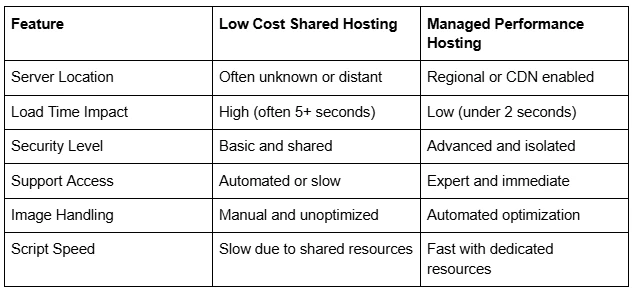
Performance Comparison Between Hosting and Optimization Choices
Selecting the right foundation is the first step toward a fast site. The following table compares common setups and their impact on speed and reliability for local businesses.
Market Data and User Expectations
User patience is at an all time low. Recent market data shows that nearly forty percent of people will leave a website if the layout is unattractive or takes too long to load. Furthermore, a one second delay in page load time can result in a seven percent reduction in total conversions. For a plumbing company or an HVAC firm, this means every second of lag could be costing hundreds of dollars in lost service calls.
Things to Consider Before Making a Decision
Before a business owner invests in a new website or a speed optimization service, they should look at a few specific factors. Not every speed issue requires a total rebuild.
- Current Mobile Speed Score: Use free tools to see how the site performs on a 4G connection.
- The Number of Active Plugins: Count how many tools are running in the background.
- Image File Sizes: Check if most images are over 500KB.
- Server Response Time: Determine if the delay happens before the page even starts to load.
- Technical Security: Verify the site has a current SSL certificate and updated software.
Common Questions about Website Performance
Owners often have questions about what constitutes a fast site and how to measure it accurately.
Does my office Wi-Fi give me an accurate view of my site?
No. Office internet is often much faster than what a customer uses on their phone. It is better to test the site using a mobile data connection while standing outside to see the real world experience.
Will a faster site improve my local search ranking?
Yes. Google explicitly uses page speed as a ranking factor. Faster sites provide a better user experience, which leads to higher placements in the local map pack and search results.
Can I fix speed issues myself?
Some issues like deleting old plugins are easy to handle. However, technical tasks like minifying code or optimizing server configurations often require a specialist to avoid breaking the site.
Better User Experiences Lead to More Local Calls
Why does my site feel fast to me but slow to others?
Browsers save a version of your site in their memory through a process called caching. Because you visit your site often, your computer loads it from its own memory rather than downloading it from the server. New customers do not have this advantage.
How do I know if my hosting is the problem?
If the site is still slow after optimizing images and removing plugins, the server is likely the bottleneck. A slow server response time is a clear sign that a hosting upgrade is necessary.
Do videos slow down my website?
Yes, if they are uploaded directly to your site. It is always better to host videos on a platform like YouTube and embed them. This allows their servers to handle the heavy lifting while your site remains light.
What is a good load time for a Vancouver business?
Aim for under two seconds. Anything under one second is excellent and puts the business in the top tier of local service providers.
How often should I check my site speed?
A quick test once a month is a good habit. Monthly updates and new content can slowly drag down performance if not monitored regularly.
Summary of Key Speed Takeaways
Website speed is a fundamental part of a company's digital reputation. Vancouver businesses that ignore hidden bottlenecks like image bloat and poor hosting will struggle to maintain their search rankings. By auditing plugins, optimizing media, and choosing high quality regional hosting, service providers can ensure they are always ready to capture a lead. Speed is not a one time project but a continuous requirement for success in a competitive local market.
Professional Assistance for Digital Growth
Navigating technical website issues can be complex for a busy business owner. Many local companies find that working with an expert team allows them to focus on their trade while their digital presence stays fast and healthy. Genius Marketing helps local service businesses in Vancouver, WA, including HVAC, plumbing, and spray foam companies, grow their revenue through practical SEO and performance optimization. For those looking to improve their lead flow and website speed, contact them at (360) 519-5100 or email info@geniusmarketingco.com to discuss a tailored strategy. Their team focuses on steady digital growth and technical reliability for local service providers.
Author: Spencer Hart, founder of Genius Marketing, has more than 25 years of experience in marketing and local SEO for service businesses. He helps spray foam, HVAC, plumbing, and other local companies bring in more leads and grow their revenue. Spencer is a serial entrepreneur and father of twins who leads a team focused on practical SEO and steady digital growth.
Reviewer: Jordan Lee is a marketing and local SEO specialist with more than 6 years of hands-on experience helping small and mid-size service businesses improve their online reach and steady lead flow.