



WordPress is the most popular website-building platform in the world. If you’ve ever thought about making a website for your business, blog, portfolio, or online store, you’ve probably heard of it. Running more than 40% of all websites on the internet—what is plateform, how does it work, and why do so many people use it? In this guide, we’ll break everything down into easy-to-understand terms.
 What is WordPress: WordPress dashboard overview showing pages, posts, themes, and plugins for beginners.
What is WordPress?
This CMS is a free and open-source content management system (CMS). In short, it’s a tool that lets you create and run a website without having to know how to code. You can make pages, write blog posts, add images, change layouts, and install features all from a user-friendly dashboard in WordPress.
There are two types:
1. WordPress.org (self-hosted)
You put it on your own hosting, which gives you full control.
2. WordPress.com (hosted)
It’s easier to get started, but you can’t change much unless you pay for an upgrade.
WordPress.org is the most popular choice among professionals and businesses because it gives them full control, better customization, and access to all plugins and themes.
How Does WordPress Work?
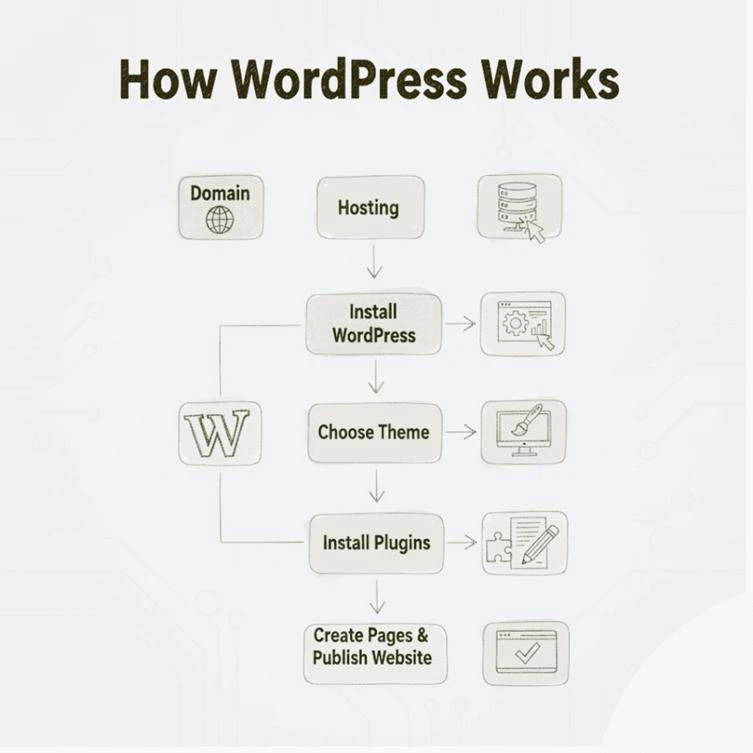
WordPress has a simple structure that anyone can understand. Here’s how it all fits together:
1. You need a domain and hosting
To run a WordPress site, you need:
- A domain name, like yoursite.com
- Web hosting—a server that keeps the files for your website
Most hosting providers let you install WordPress with one click. If you choose reliable WordPress hosting, your website will run faster and more securely.
2. WordPress Dashboard
You can do the following things after you install WordPress and log in to your dashboard, which is the backend panel where you control everything:
- Make pages and posts
- Upload files
- Pick a theme
- Add plugins
- Control settings
Even beginners can get to everything—
3. Themes Decide How It Looks
A WordPress theme is like a template that tells your site how it should look. There are thousands of both free and paid themes to choose from. You can choose a design that fits your business, blog, or brand identity and change it without having to write any code.
4. Plugins Add Features
Plugins are like apps for your website. They let you add things like:
- Forms for getting in touch
- SEO improvement
- Safety
- Caching to make things faster
- WooCommerce is the online store’s function
With more than 60,000 plugins, you can turn WordPress into anything you want, from a simple blog to a full eCommerce site.
Who Uses WordPress?
People and businesses of all kinds use WordPress because it can meet almost any website need. Here are some examples:
1. People who write blogs and make content
WordPress began as a place to blog, so it’s great for:
- Blogs for people
- Blogs about travel
- Blogs about recipes
- Sites that report the news
WordPress is great for writers because it’s easy to publish and get high rankings on Google.
2. Small Businesses
WordPress is used by small businesses like restaurants, salons, travel agencies, and fitness centers to make cheap, professional websites.
3. Big Businesses
WordPress is flexible enough that even big brands trust it. Some of these brands are:
- The Times of New York
- Sony Music
- BBC America
- News from Microsoft
4. eCommerce Stores
Using WooCommerce, WordPress turns into a full online store. This is great for:
- Brands of clothes
- Stores that sell home decor
- Digital goods
- Businesses in the area that want to sell online
5. Personal Branding and Portfolios
Photographers, designers, freelancers, and influencers all use WordPress to show off their work in a beautiful way.
What Makes WordPress So Popular?
There are a lot of website builders out there, but WordPress is still the best choice for both beginners and experts.
Here’s why:
1. It is free and open source
WordPress itself is free—You only have to pay for hosting and a domain name. Because it’s open source, developers all over the world are always making it better.
2. No need to code
You don’t need any technical skills to make a beautiful website with drag-and-drop builders like Elementor, Divi, or the default Block Editor.
3. Very customizable
Design is controlled by themes, and plugins add features. You can keep changing things to fit your needs.
4. Good for SEO
WordPress is the best platform for getting high rankings on Google:
- Structure of the site is clean
- Quick loading
- Yoast and Rank Math are examples of SEO plugins
This is why bloggers and businesses love it.
5. Safe and Dependable
With the right security and hosting plugins, WordPress is one of the safest platforms. Regular updates keep your site safe from threats—
6. You Own Everything
Unlike website builders like Wix or Shopify, you have full ownership and control over your website, data, and files with WordPress.
In Conclusion
WordPress is powerful, flexible, easy to use for beginners, and trusted by millions of people around the world. You can make a simple blog, a corporate website, a portfolio, or a full online store. You don’t need to know how to code to use WordPress to build it.
If you want a website that you can count on and that can grow with you over time, you can’t go wrong with WordPress.