



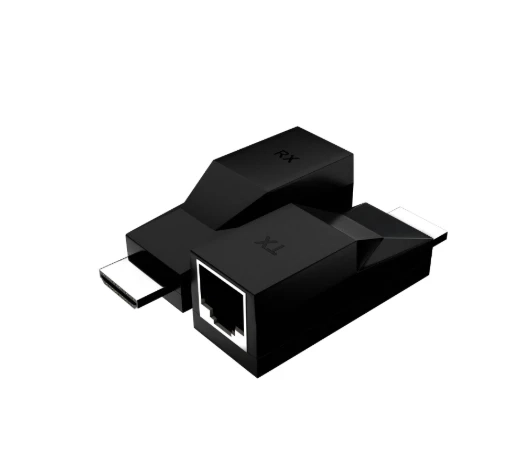
In today’s digital world, a seamless audio-visual (AV) experience isn’t just a luxury—it’s essential. Whether you’re building a cozy home theater or optimizing video conferencing at work, the right AV solutions make all the difference. One standout tool for achieving this is the HDMI extender. But what exactly are HDMI extenders, and how can they elevate your home or office setup?
What Are HDMI Extenders?
HDMI extenders are devices that allow high-definition video and audio signals to travel over long distances without any loss in quality. They are particularly useful when your source device and display are far apart—think large office spaces, classrooms, or home setups where you want a clean, cable-free aesthetic. Unlike standard HDMI cables, which often lose signal quality beyond 50 feet, HDMI extenders maintain crisp visuals and sound over much longer distances.
How Do HDMI Extenders Work?
HDMI extenders work by converting HDMI signals into a format that can travel further—most commonly using HDBaseT technology. This technology transforms HDMI signals into data packets that can be transmitted over standard Ethernet cables. The result is a reliable, long-distance transmission that supports high resolutions, including 4K, ensuring that your video and audio remain flawless.
Why You Need an HDMI Extender
1. Enhanced Flexibility and Reach
An HDMI extender allows you to place your devices exactly where you want. Your TV or projector can be positioned anywhere, without being tethered to the source device by short HDMI cables. This improves both the functionality and aesthetics of your space.
2. Superior Audio and Video Quality
HDMI extenders preserve the integrity of your video and audio signals over long distances, making them ideal for home theaters, conference rooms, or any environment where clarity is crucial.
3. Cost-Effective Solution
Using your existing Ethernet infrastructure, HDMI extenders reduce the need for expensive long HDMI runs. This is particularly advantageous in larger installations with multiple displays.
How to Set Up an HDMI Extender System
Setting up an HDMI extender is straightforward. Follow these steps:
- Choose the Right Extender: Ensure it supports your required resolution (e.g., 4K) and distance needs.
- Connect the Source Device: Plug your Blu-ray player, gaming console, or other source into the transmitter unit.
- Use Ethernet Cables: Connect the transmitter to the receiver using high-quality Ethernet cables suitable for your distance.
- Connect the Display: Attach your TV, projector, or monitor to the receiver unit.
- Power On and Test: Turn on the system and verify that the signal maintains high quality and clarity.
Future Trends in HDMI Extenders
HDMI extenders are evolving to meet the demands of modern AV setups. Here’s what’s on the horizon:
- Wireless HDMI Extenders: Offering more setup flexibility, though care is needed to avoid potential interference.
- Smart Home Integration: Future extenders will work seamlessly with smart home systems for centralized control and automation.
- Support for Higher Resolutions: With 8K displays becoming more common, HDMI extenders are adapting to handle higher resolutions, ensuring long-term relevance.
Conclusion
Whether upgrading a home theater or optimizing an office AV setup, HDMI extenders are essential for a high-quality, flexible, and reliable audio-visual experience. Understanding how they work, their benefits, and emerging trends will help you make informed decisions, creating a seamless and future-proof AV environment.