



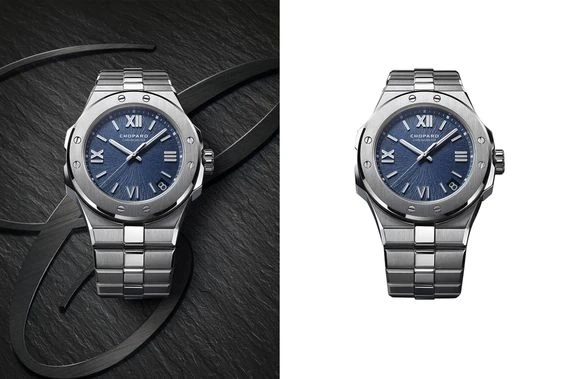
How to Remove Background from Photo in 2023 - A Comprehensive Guide
Introduction
In the world of photography and graphic design, removing the background from an image is a common task. Whether you\'re creating a marketing campaign or simply enhancing your personal photos, the ability to remove backgrounds can make a world of difference.

Fortunately, technology has made this task easier than ever before. In this article, we\'ll take a look at the latest tools and techniques for removing backgrounds from photos in 2023. From basic manual editing to AI-powered automation, we\'ll cover it all.
So, without further ado, let\'s dive into the world of background removal.
https://theomnibuzz.com/custom-clipping-path-services-to-meet-your-unique-needs/
Manual Techniques for Removing Backgrounds
While there are plenty of automated tools available for background removal, sometimes it\'s best to do things manually. This gives you more control over the process and can help you achieve a more polished result.
Here are some manual techniques for removing backgrounds from photos:
- Magic Wand Tool: This tool is available in most photo editing software and can be used to select areas of an image based on color. Simply select the magic wand tool, click on the area of the background you want to remove, and hit delete. Keep in mind that this tool can be imprecise, so you may need to refine your selection using other tools.
- Lasso Tool: The lasso tool allows you to draw a freehand selection around the area you want to remove. This can be more precise than the magic wand tool, but it requires a steady hand and some practice.
- Eraser Tool: The eraser tool is a basic tool that allows you to manually erase parts of an image. This can be useful for removing small areas of a background or fine-tuning your selection.
- Pen Tool: The pen tool is a more advanced tool that allows you to create precise, vector-based selections. This can be useful for removing complex backgrounds with lots of detail.

Automated Tools for Removing Backgrounds
While manual editing can be effective, it can also be time-consuming and require a lot of skill. Fortunately, there are plenty of automated tools available for removing backgrounds from photos. These tools use AI and machine learning algorithms to analyze images and remove backgrounds with minimal user input.
https://theomnibuzz.com/how-clipping-path-service-for-photo-ghost-mannequin/
Here are some of the best-automated tools for background removal in 2023:
- bg: Remove.bg is a popular online tool that uses AI to remove backgrounds from photos. Simply upload your image, and the tool will automatically remove the background for you. The tool is free to use, but it does have some limitations, such as a maximum image size of 5 megapixels.
- Clipping Magic: Clipping Magic is another popular online tool that uses AI to remove backgrounds from photos. It offers more advanced features than Remove.bg, such as the ability to refine your selection using multiple tools. However, it also comes with a price tag of $3.99 per month.
- Adobe Photoshop: Adobe Photoshop is a professional-grade photo editing software that includes advanced background removal tools. These tools allow you to remove backgrounds with precision and control, but they do require some skill and practice to use effectively.
Tips for Seamless Background Removal
Whether you\'re using manual or automated tools, there are some tips you can follow to achieve a more seamless result. Here are some tips for background removal:
- Choose the right tool for the job: Depending on the complexity of the background and the level of precision you require, different tools may be more effective. Experiment with different tools
- Use high-quality images: Background removal works best when you\'re working with high-quality images. Low-resolution images can result in jagged edges and a less polished final product.
- Refine your selection: Even if you\'re using an automated tool, it\'s important to refine your selection manually. Use the eraser tool or other selection tools to clean up any areas that the automated tool may have missed.
- Pay attention to detail: When removing a background, it\'s important to pay attention to detail. Zoom in and check your selection for any small areas that may have been missed.
- Save your image with a transparent background: Once you\'ve removed the background, save your image with a transparent background. This will allow you to easily place the image on different backgrounds without any unwanted white space.
https://theomnibuzz.com/get-rid-of-the-clutter-with-transparent-image-backgrounds/

FAQs
Q: Can I remove the background from any photo?
A: In most cases, yes. However, the complexity of the background and the quality of the image can affect the final result.
Q: Can I remove the background from a video?
A: Yes, you can remove the background from a video using video editing software such as Adobe Premiere or Final Cut Pro.
Q: How do I remove the background from a transparent PNG image?
A: If the PNG image already has a transparent background, there\'s no need to remove it. However, if you want to replace the existing transparent background with a different color or image, you can use a photo editing tool such as Adobe Photoshop to do so.
Conclusion
Removing the background from a photo can be a powerful way to enhance your images and take your design skills to the next level. Whether you\'re using manual techniques or automated tools, it\'s important to pay attention to detail and choose the right tool for the job. With the latest AI-powered tools and techniques available in 2023, background removal has never been easier or more accessible. So why not give it a try and see how you can transform your images today?
Facebook: https://www.facebook.com/expertclipping
G+: https://plus.google.com/u/0/+expertclipping-ec
Twitter: https://twitter.com/expertclipping
Yelp: https://www.yelp.com/biz/expert-clipping-barking
Youtube: https://www.youtube.com/c/Expertclipping-ec
Contact: Contact us | Clipping Path Quality Service | Expert Clipping
Free quote: Photo Editing Services Free Quote With Expert Clipping
Pricing & Payments: Affordable Photo Editing Service Prices | 100% guarantee
Google Maps: https://goo.gl/maps/tj5FRP3vVMbW1uzM9
Office address:
Bangladesh office:
House # 02 Section # 01 Road # 01 Mirpur-1 Dhaka-1216, Bangladesh.
E-mail: hello@expertclipping.com
Phone: +880 1711011258
UK OFFICE
24 Longbridge Road
Barking Essex IG118tnv
Phone: 02036093822
ITALY OFFICE
168 Belaws, 4th Floor
Via Tolpada 21, 11400